Why does naive `btoa(text)` go wrong on non-ASCII input, and how does this page avoid it?
Two different failure modes, depending on which side of the Latin-1 boundary the codepoint sits on. Latin-1 characters (`é` is U+00E9, `ñ` is U+00F1, `ß` is U+00DF, the whole `0x80`–`0xFF` range) do not throw — `btoa("café")` returns `Y2Fm6Q==` happily — but the encoded value is wrong: `btoa` packs the codepoint as a single Latin-1 byte (`0xE9`), not the two-byte UTF-8 sequence (`0xC3 0xA9`) that any UTF-8 decoder downstream is expecting. So the encoded value round-trips back to `café` only if the consumer also assumes Latin-1; against a Node `Buffer.from(b64, "base64").toString("utf8")` or Python `base64.b64decode(b64).decode("utf-8")` it produces a UnicodeDecodeError or a U+FFFD replacement. Codepoints above U+00FF — `漢` (U+6F22), an emoji (U+1F600), an em dash (U+2014) — are the loud failure: `btoa` raises `InvalidCharacterError: The string to be encoded contains characters outside of the Latin1 range`. The historical pattern of `btoa(unescape(encodeURIComponent(text)))` works around both but is unintuitive and silently relies on the legacy `unescape` function. This page uses the modern equivalent: `TextEncoder().encode(text)` produces a `Uint8Array` of the real UTF-8 bytes for any string, and we Base64-encode that byte sequence directly. That keeps the encoded value byte-for-byte identical to what a Node `Buffer.from(text, "utf8").toString("base64")` or a Python `base64.b64encode(text.encode("utf-8"))` would produce — which is what the consumer on the other end is almost certainly expecting.
What is URL-safe Base64 and when do I need it?
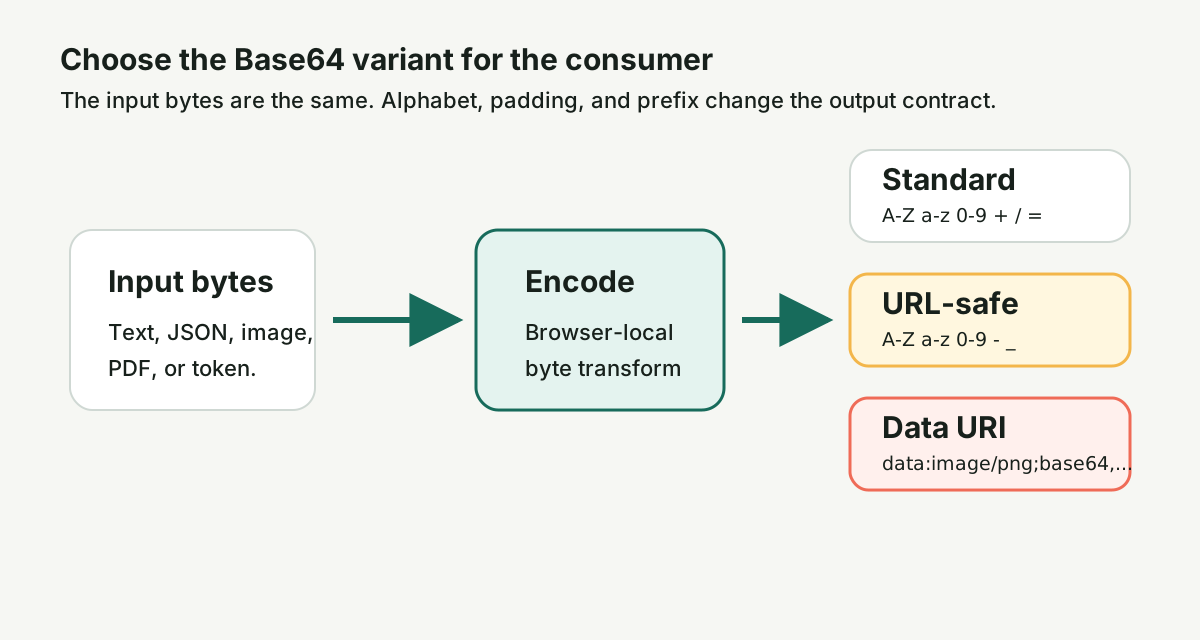
Standard Base64 (RFC 4648 §4) uses the alphabet `A–Z a–z 0–9 + /` plus `=` padding. URL-safe Base64 (RFC 4648 §5) replaces `+` with `-` and `/` with `_` so the encoded value is safe inside URL query strings, URL fragments, filenames, and headers — `+` is interpreted as a space in `application/x-www-form-urlencoded` payloads, and `/` would be parsed as a URL path separator. JWTs, JWS signatures, OAuth `state` values, signed cookies, and most signed-URL APIs (S3, CloudFront, Cloudflare R2) use the URL-safe alphabet, almost always without `=` padding (the `=` would itself need to be percent-encoded inside a URL). Use URL-safe whenever the output is going to live inside a URL or a header that gets URL-encoded; use standard Base64 for MIME bodies, PEM-armored payloads, and anything else that travels over a non-URL transport.
Should padding (`=`) be on or off — and when does each consumer expect which?
Keep padding on (the default for standard Base64) for: SMTP/MIME attachments (RFC 2045), PEM-armored keys and certs (RFC 7468), most Java decoders (`java.util.Base64.getDecoder()` rejects unpadded by default and requires `getDecoder().withoutPadding()` or `getMimeDecoder()` to relax), and any tool whose docs say "RFC 4648 strict." Strip padding for: JWTs and JWS signatures (the JWT spec mandates the URL-safe alphabet without padding), signed cookies that need to fit inside a max-size header, S3 multipart upload IDs, and anywhere the output lives inside a URL where the `=` would need to be percent-encoded into `%3D`. Toggling URL-safe on flips the padding switch off automatically because the JWT convention is the dominant URL-safe consumer; the explicit Strip = padding checkbox lets you override that pairing if your specific consumer wants the strict form.
What MIME types does the data URI builder support, and why is the list short?
The allowlist is text/plain, text/html, image/png, image/jpeg, image/svg+xml, application/pdf, application/json, application/octet-stream. These eight types cover the overwhelming majority of legitimate inline-asset use cases — the small icons, in-app brand marks, inline SVGs, and PDF stamps that benefit from a data URI in CSS, HTML, or SVG contexts — and they share the same allowlist contract as the [/base64-decoder/](/base64-decoder/) page's mediatype routing, so a value encoded here decodes there with the same mediatype displayed back. The list is short on purpose: a free-form MIME field would let a paste of `data:text/html;base64,...` round-trip through the encoder unchallenged, and we would rather make the user click into the allowlist (and read the names) than ship a one-line vector for a bookmarklet that abuses the field. If your real MIME type is not on the list (say `audio/mpeg`, `video/mp4`, or a vendor-prefixed type) the right call is almost always to host the file rather than inline it — multi-megabyte data URIs bloat every consumer that touches the surrounding text.
Can I make a data URI for an inline image with this?
Yes. Drop the image file (PNG, JPEG, or SVG), turn on "Wrap as data: URI," and the output is `data:image/png;base64,iVBOR...` (or `data:image/jpeg;base64,/9j/...`, or `data:image/svg+xml;base64,PHN2Zy...`) ready to paste into a CSS `background-image: url(...)` rule, an HTML `<img src="...">` attribute, or an SVG `<image href="...">` reference. The page detects the file's MIME type from its extension and uses it as the prefix automatically when the type is on the allowlist; if you are encoding raw text into an `image/svg+xml` data URI, switch to text input and pick `image/svg+xml` from the dropdown. Inline data URIs are most useful for small assets (under ~10 KB raw, under ~14 KB after the 33 % Base64 inflation) — past that, an external URL is almost always the right call because the inlined bytes get parsed and stored in every consumer that touches the surrounding HTML or CSS.
How big can the input be, and is the file uploaded anywhere?
The file path is capped at ~10 MB on the transform call itself — `btoa` allocates the whole encoded string before yielding it back to the page, the textarea round-trip allocates again on top of that, and `FileReader.readAsArrayBuffer` holds the raw bytes alongside. Past that point, the encode runs but the page may freeze for a second on lower-RAM devices. The text path is capped at ~1 MB on the transform call. For genuinely large inputs the right tool is a streaming Base64 encoder — `base64-stream` (Node), `openssl base64` (command line), or a small `Buffer.from(buffer).toString("base64")` script. As for upload: nothing leaves your browser. `btoa`, `TextEncoder`, and `FileReader` are all native browser APIs and run inside this tab. The bytes, the encoded output, the data URI, and any download all stay on your device. There is no signup, no watermark, no analytics on the payload itself. Safe for API tokens, JWT claims, private keys, and config exports.
What's the difference between Base64, Base64URL, and Base32?
Base64 (RFC 4648 §4) packs 3 bytes into 4 ASCII characters from the alphabet `A–Z a–z 0–9 + /` plus `=` padding — the standard everyone means by "Base64." Base64URL (RFC 4648 §5) uses the same packing but swaps `+` for `-` and `/` for `_` so the output is safe inside URLs and filenames — JWTs, OAuth, and most signed-URL APIs use this. Base32 (RFC 4648 §6) is a different alphabet (`A–Z 2–7`, no `0`/`1`/`8`/`9` to avoid visual ambiguity) that packs 5 bytes into 8 ASCII characters; it's used in QR codes, TOTP shared secrets (your authenticator app's setup string), and any context where the encoded value will be read aloud or typed by hand. They are not interchangeable — picking the wrong one yields wrong bytes that look right enough to pass a casual eyeball test. This page handles standard Base64 and URL-safe Base64; for Base32 use a dedicated tool because the alphabet and padding rules differ.
When should I use this versus a streaming or CLI encoder?
Use this page for ad-hoc work: encoding a single text value, wrapping a small image as a data URI, generating a JWT-shaped Base64 payload, debugging an API request, or round-tripping a file under ~10 MB. Use a streaming encoder when the input is genuinely large (multi-megabyte logs, video files, full backups), when the encode is part of a build pipeline (`openssl base64 -A` in a shell script, `Buffer.from(buf).toString("base64")` in a Node module), or when the consumer wants a specific MIME-style line wrap (`base64` on macOS/Linux wraps every 76 characters by default, matching RFC 2045). The page deliberately does not implement line wrapping or stream-based encoding — those are downstream concerns where the right answer is a CLI or a library, not a browser textarea.
Will this tool stay free?
Yes. The core workflow stays free. Optional Day and Project Passes add more file and batch headroom on supported file-pipeline tools when you hit the free limits.

 Base64 Decoder — Free, In Your Browser