Nifty Tools

QR code generator

QR code generator for links, menus, posters, and labels — with custom colours, logo overlay, and ECC tuned automatically so the code still scans.

Processing mode: Local Browser-local

Type or paste content to render a QR.

How to use it

QR Code Generator Online Free

  1. Type or paste the destination text or URL into the content field. The preview renders immediately and updates as you adjust controls.
  2. Tune size, colours, error-correction level, and quiet-zone margin. Optionally drag a logo image into the dropzone — error correction promotes to H automatically and the size slider sets the overlay percentage.
  3. Wait for the preview to settle (the debounce runs ~150 ms after the last change), then download as PNG (raster, fixed pixel size) or SVG (vector, scales without re-rendering). Both files are produced from the same canvas the preview shows.

Good for

Common use cases

A QR code generator earns its keep when a phone camera is the simplest path between a printed surface and a working URL. Restaurants put one on the bottom of a menu so a guest can pull up the wine list, the allergen sheet, or the bill on their own device without a waiter scrolling through a tablet. Event organisers print one on a badge or lanyard so a sponsor can capture the agenda, the floor plan, or the post-event survey by pointing at a card. Retailers stick them on shelf-edge labels so a shopper standing in the aisle can read warranty terms, demonstration videos, or sizing guides that would never fit on the packaging. Marketing teams print them on posters, vehicle wraps, packaging, and direct-mail pieces so an offline impression becomes a measurable click with a UTM-tagged destination. Internal tools use them to bridge the gap between a printed asset register and the live record in the database — scan a sticker on a server, on a rented camera, on a fire extinguisher, and the inspection log opens directly. The codes generated here are static — the destination is baked into the matrix at scan time — which means no third-party redirect, no dependency on a QR vendor's analytics service, and no redirect-domain failure point beyond the URL the encoder pointed at.

Processing mode

Browser-local

Files are processed by your browser. They never reach our servers.

Features

What this tool handles

  • Live preview that re-renders on every input change (debounced ~150 ms) — no separate "Generate" button click before download
  • Optional logo overlay (PNG, JPG, WebP, SVG) with size slider 10–25%, optional white halo to keep the overlay visually separated from QR modules
  • Error-correction control L/M/Q/H with auto-promotion to H whenever a logo is loaded — the control locks until the logo is removed and a badge explains why
  • Foreground and background colour pickers with a WCAG 4.5:1 advisory warning when contrast falls below a conservative readability threshold
  • Margin (quiet-zone) control 4–8 modules, default 4 — sub-spec values are not selectable; the v1 default of 2 was below ISO/IEC 18004 §6.3.3
  • Empirical post-render decode verification — the rendered canvas is handed to a vendored `jsQR` after every change, and a "decode failed" advisory surfaces if the matrix cannot be recovered (catches edge cases that pass contrast and overlay-area heuristics)
  • PNG (raster) and SVG (vector) downloads — both buttons enabled the moment a valid render lands; SVG embeds the QR matrix as a single `<path>` for crisp print at any size
  • Browser-local — the payload, the logo bytes, and the decode-verification sample never leave the tab; no signup, no watermark, no telemetry on this page

Questions

QR Code Generator Online Free FAQ

Are these static QR codes?

Yes. The destination is encoded directly into the matrix, so a scan reads the URL with no third-party redirect in between. Once the code is printed, the URL is fixed; changing the destination means updating the page behind that URL or reprinting the code. Static codes work best with stable URLs on your own domain (`yourdomain.com/menu`, `yourdomain.com/landing/spring`) rather than a vendor redirect you do not control. Dynamic QR codes — editable destinations, scan analytics, and custom short domains — are a separate product class and are not delivered by this generator.

Can I customise colours and add a logo?

Yes to both. Foreground and background colours are exposed as colour pickers, and you can drop a logo image (PNG, JPG, WebP, or SVG) onto the workspace to centre it on the rendered code. Logo size is a slider (10–25% of the QR area) with an optional white halo behind the logo to keep it visually separated from the surrounding modules. When a logo is loaded the error-correction level promotes automatically to H, the QR level with the highest standard redundancy. The harness verifies the default synthetic-logo cases at 18% and 25%, but real logos, colours, lighting, and print surfaces still deserve a phone scan before a large print run. A badge near the ECC control explains the lock so the auto-promotion does not feel arbitrary; remove the logo and the control re-enables.

Why did my QR colour get rejected as low contrast?

It was not rejected — the warning is advisory, not blocking, and the download buttons stay enabled. The check uses the WCAG 4.5:1 contrast ratio between the foreground and background colour as a conservative readability proxy: below it, phone cameras may have trouble separating dark modules from light ones, especially under cool indoor lighting or at oblique angles. Some low-contrast pairs still decode in the `jsQR` verification pass, in which case the "decode failed" warning stays quiet. If both the contrast warning and the decode-failed warning are showing at once, the right move is to bump the foreground darker or the background lighter; the WCAG ratio is the fast proxy and the decode pass is the stronger signal.

What's the largest logo I can use?

The slider tops out at 25% of the QR area, which is this tool's ceiling for a centred overlay at ECC level H. Above 18% the tool surfaces a "logo too large" advisory: even at H, an 18%-plus overlay is close enough to the practical edge that phone-camera quality, lighting, print texture, and logo shape can decide whether it scans. The right move before printing is a physical-phone scan from the intended distance. The decode-failed warning will fire if the overlay actually breaks the rendered matrix, in which case the safest fixes are a smaller logo, a cleaner halo, or a simpler logo silhouette.

Why is my downloaded SVG smaller in pixel terms than the PNG?

Because SVG has no pixel resolution. The PNG download bakes the QR matrix into a fixed-pixel raster at whatever size the slider was on at download time (so a 512-px slider produces a 512-px PNG), and that pixel size is what the file's image-properties dialog reports. The SVG file, by contrast, encodes the QR matrix as a single vector `<path>` element with a `viewBox` tied to the module count and quiet-zone margin — its on-disk size is a few kilobytes regardless of how large you eventually render it, and the renderer (browser, print pipeline, design tool) decides the pixel size at render time. SVG is the right format for posters, packaging, vehicle wraps, and any print job where the final size is not known up front; PNG is the right format for slide decks, web pages, and mockups where the pixel grid is fixed.

What can I encode in a QR code?

Any short text or URL — most commonly links, vCards, Wi-Fi credentials, or UTM-tagged campaign URLs. The QR matrix grows denser as the payload grows longer (more modules per side at the same physical print size), and dense codes are harder to scan from a distance. As a rule of thumb, keep URLs short where possible — a long UTM-tagged campaign URL can benefit from a short URL on your own domain rather than a public shortener that introduces a redirect dependency you do not control. For non-URL payloads (Wi-Fi, vCard, geolocation, plain text), many current phone QR flows parse common payload formats and offer the appropriate action automatically.

What format are the downloads, and which should I pick?

PNG and SVG. PNG is raster, locked to a fixed pixel size, and the right choice when the QR is going into a slide deck, a web page, an e-mail signature, a mockup, or anywhere the final pixel grid is fixed. SVG is vector, scales to any size without re-rendering, and the right choice when the QR is going onto a poster, a vehicle wrap, packaging, signage, a business card, or any printed surface where the dpi at print time is not known when the file is generated. JPG is deliberately not offered — JPG's lossy compression can introduce ringing artefacts on the high-contrast edges of QR modules, and PNG covers the raster use case without that risk.

Will this tool stay free?

The basic workflow is designed to stay free. Paid upgrades later will focus on bigger limits, batch work, OCR, saved presets, and ad-free use.

Deep dive

More about qr code generator

How error correction interacts with logos

QR codes carry redundancy in four levels — L, M, Q, H — corresponding to roughly 7%, 15%, 25%, and 30% error-correction capacity. Without a logo, M is a sensible default: the matrix stays compact and still handles ordinary print noise. A centred logo changes that trade-off because it covers part of the matrix before lighting, print texture, and camera angle add their own damage. The auto-promote-to-H rule gives logo mode the highest standard redundancy, which is a better fit for the 18% to 25% overlay range the slider exposes. The trade-off is density: H can produce smaller modules at the same physical size, so always scan the intended printed size before committing to a run.

Print sizing rule of thumb

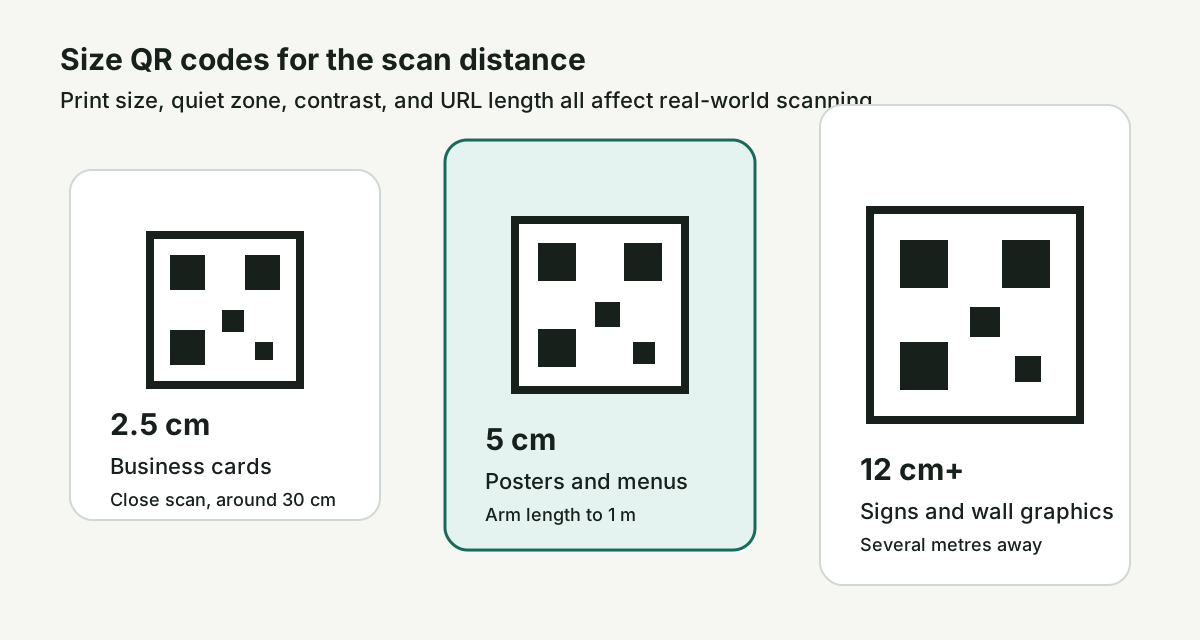
A practical print-sizing rule is to keep each QR module large enough that a phone camera can separate it from the surrounding modules at the intended scan distance. For a short URL at error-correction level H, the matrix often lands around 33 to 41 modules per side once the quiet-zone margin is included, so small physical changes matter: shrinking a code from 5 cm to 2 cm can turn a comfortable scan into a marginal one. In practical terms, treat these as starting points to verify with a physical phone scan: a business card or table tent intended to be scanned at arm's length (about 30 cm) often works around 2.5 cm wide; a poster intended to be scanned from about 1 metre away is safer around 5 cm wide; a wall graphic intended to be scanned from several metres away may need a 12 cm+ code. SVG is the better output format across that range — the same vector file resizes without re-rendering, so a packaging printer can produce the small version and a vehicle-wrap shop can produce the large version from the same source. PNG download fixes the pixel size at download time, which is fine for slide decks but less flexible for variable-size print runs.

What's static vs dynamic and why we ship static

This generator produces static QR codes: the destination URL is baked into the matrix, with no redirect database between the printed code and the destination. Dynamic QR codes point at a vendor-controlled redirect domain, then look up the current destination in server state. That enables editable destinations and scan analytics, but it also requires an account, a redirect host, and a service that must keep running after the code is printed. Static is the better fit for this zero-account browser tool. Use a stable URL on your own domain — `yourdomain.com/menu`, `yourdomain.com/wifi`, `yourdomain.com/landing/spring` — and update the page behind it when the content changes.